Cases Dashboard
Purpose
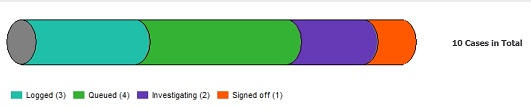
The Cases Dashboard is designed to assist staff to manage their case workload by providing an overview of cases assigned, by type and stage. The pipeline is a visual representation of the number of cases at different work stages, and also serves as a filter when a section is selected.
When viewed from the My CRM menu, the cases dashboard is pre-filtered to show only cases assigned to the logged-in user. If system permissions allow, alternative user names can be selected from the My CRM For: menu.
When viewed from the Team CRM menu, the cases dashboard is pre-filtered to show all cases assigned to the team of which the logged-in user is a member. If system permissions allow, alternative (or all) teams can be selected from the Team CRM: menu.
Button Functions
|
Filter Options
|
Description
|
|
Site
|
Lookup to list of sites/cemeteries
|
|
Stage
|
Selection list of workflow stages
also actioned by selecting directly in the pipeline |
|
Category
|
Selection list of case categories: Client Feedback, Incidents, Works Requests
|
|
Filter
|
Filters the detailed list of cases according to selections made above
|
|
Buttons
| |
|
New Case
|
Opens new case entry screen
|
|
Help
|
CRM help menu
|