Once you have accessed the transfer, whether directly from the Transfers tab of the Sales & Booking or by completing a search, you can assign a transfer to a team member when necessary.
Simply press the Change button on the right-hand side of the Transfer screen.
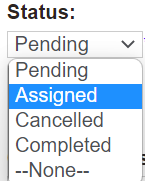
Update the Status field of the Transfer to 'Assigned.'
Update the Assigned To field to the person / resource the transfer is being assigned to.
Then press the Save button on the right-hand side of the page.