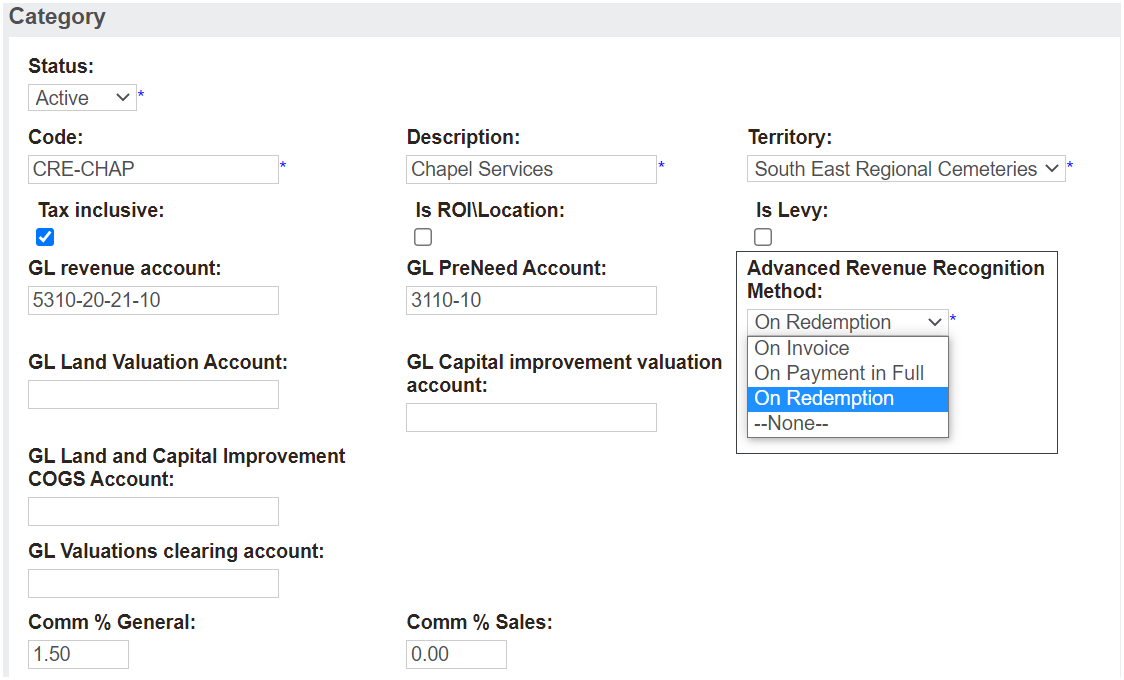
Advanced Revenue Recognition Method
When a category is linked to an item code, the category setups for advanced revenue recognition will apply and the associated general ledger transactions will be processed where AdvancedRevenueRecognitionMethodNeeded is configured to Y in Admin > Cemetery System Setup > Custom Configuration.
With the exception, if the create pre-need on invoice is ticked þ on the item, the rules on the Item prevail over the rules applied at the category level and all purchases whether at need or preneed will be processed as pre-need AND will look to the ARR setting and honor that setting.
So where create preneed on invoice is ticked on the item and advanced revenue recognition method is configured to Y, and an advanced revenue recognition method is applied to the category, any at-need purchase will be processed as a pre-need transaction and the processing steps will look to the ARR method on the category to process according to those settings.
The two scenarios a user may be faced with in relation to the create preneed on invoice tickbox are:
1. Where Advanced Revenue Recognition is not switched on and the item setting has the Create preneed on invoice ticked, the setting will send all at-need and pre-need purchases to pre-need. These items will need to be manually taken up / redeemed to recognise the revenue.
2. Where Advanced Revenue Recognition is switched on, in any circumstance whether the item is sold as at-need or pre-need, all purchases will be processed as pre-need AND will look to the ARR setting and honour that setting. These items will automatically recognise revenue based on the category setting:
Let us now look at the three options for recognising revenue on a category, when Advanced Revenue Method is switched on:
Recognise Revenue ‘On invoice’
Revenue recognised immediately at time of invoice
Recognise Revenue ‘On payment in full’
At time of invoice, the unearned income account holds the value of the revenue to be recognised on payment in full. At the time the payment in full is applied to the invoice, the unearned income account is cleared and revenue is recognised.
Recognise Revenue ‘On Redemption’
At the time the item is redeemed, the value is cleared from the unearned income account and revenue is recognised.
Comes about mainly due to the need to recognise revenue in the period the revenue is earned and when the service is provided.
Keeping in mind that sometimes pre-need items are purchased some years in advance and the timing of delivering that service proves a significant time difference.
The value of the revenue to be recognised is held in the unearned income account until such time as the item is redeemed.
These methods are provided to allow cemeteries to recognise revenue and associated costs in the same reporting period, depending on their requirements and rules they may be governed by.