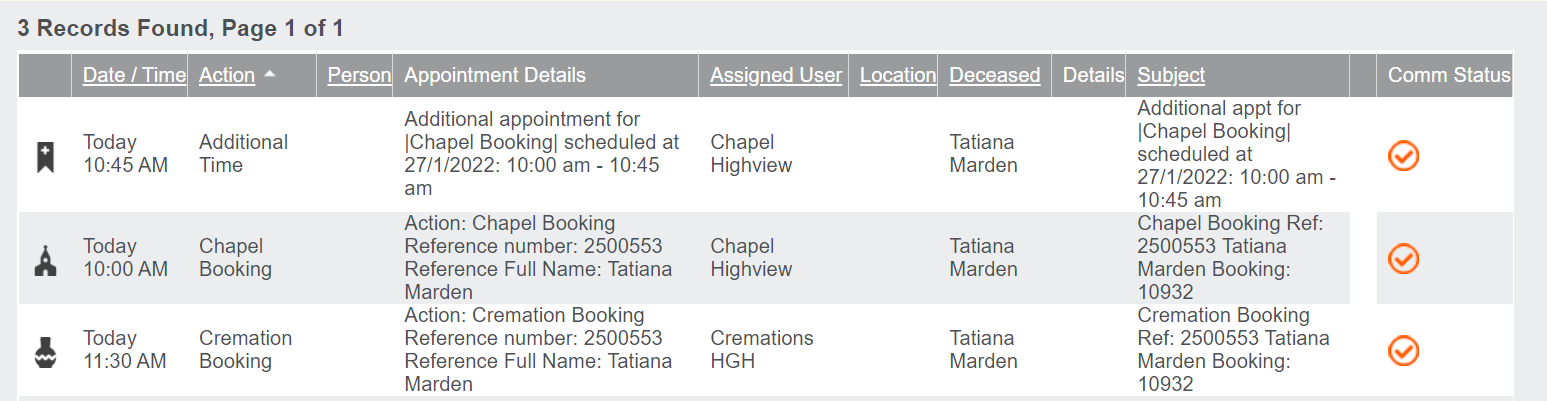
Chapel resources, and other resources such as function rooms, can be set with Additional time appointments, as shown below. These are set in the Calendar Rule Setups for the specific resource, so each chapel could have different rules for the additional time.
The additional time feature would be used to block out a designated amount of time the cemetery staff need to reset after the previous appointment and prepare for the next appointment.
For the Chapel at Highview, our example below, it is currently set for 45-minute appointment times, with 15-minutes of additional time.
Any time a booking is made with a resource which has additional time, an extra appointment will appear in the Communication tab only.
While these additional appointments can be edited themselves, it is recommended to make any edits on the initial appointment, as amendments made to the original booking will also amend the additional time.
Should an extension of the additional time appointment be required, you have the ability to edit the additional time.