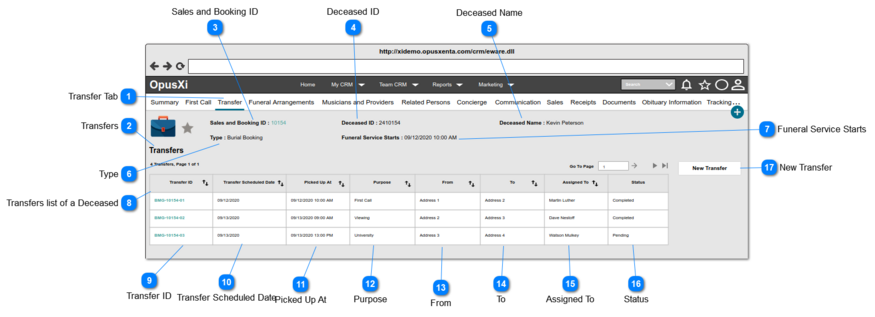
1. Display the Sales and Booking ID as an anchor text and when the user clicks on the anchor text, the system will navigate the user to the Sales and Booking summary page (i.e. the Summary Tab).
1. IF a person has been attached/linked to the sales and booking record, the "Reference No" of the that person will be displayed, otherwise this will be blank.
1. IF the deceased person record created; display the full name of the deceased person.
2. IF the deceased person record NOT yet created, show the <<Deceased Given Name>> <<Deceased Surname>> which the details provided when creating the Sales and Booking record.
3. Show as blank, IF the name of the deceased person not yet set.
1. ONLY the transfer records related to the Sales & Booking will be listed down in this table.
2. By default, sort the table by the column "Transfer ID" in ASC order.
3. This table allows the user to,
sort by all the columns in ASC or DESC order.
move other pages by the navigator placed at the top right corner of the table.
4. If the system found records, show the text, placed at the top left corner of the table. The format of the text is <<search results count>> Transfers, Page <<current page number>> of <<total pages count>>
5. If no results found, show the text "No Transfer records", placed at the top left corner of the table.
6. IF the data/details of a record empty/null, the column will be blank.
Column in the table showing Transfer ID of the Transfer records.
1. Each Transfer ID will be an Anchor Text, and when the user clicks on the anchor text, the system will navigate the user to the "Transfer Summary" page (the appearance of this page will be same as the New Transfer page with the prefilled data).
2. The text format of the options will be:
<<Funeral Home Code/Site>>-<<Sales and Booking ID>>-<<Transfer number>>