byondpro
Functional Specifications
×
Menu
Index

Reverse Redemption

This function will clear redemption values from the pre-need register.
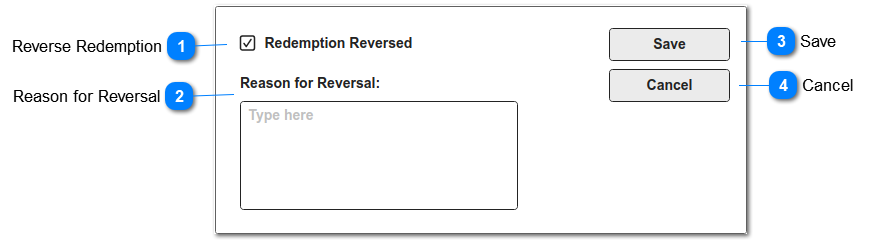
This screen is displayed when Reverse Redemption button is selected on the PreNeed Register.
 
Reverse Redemption
1

Reverse Redemption

 
This confirms that the pre-need entry is to be reversed.
 
Type
Notes
Rules
Compulsory
Format
Edit
Size
Default
Error Message
Checkbox
Same field as #6 on Pre-Need Register
1) set to Y when screen opens
Y
checkbox
Y


2

Reason for Reversal

 
This allows the user to enter a text description / reason for the reversal of the pre-need redemption.
 
Type
Notes
Rules
Compulsory
Format
Edit
Size
Default
Error Message
Multi-line text
Same field as #9 on the Pre-Need Register
 
Y
text
No


3

Save

 
This will update the pre-need register with the above values, plus user name, date and time.
This will clear the pre-need register values relating to the original redemption.
 
Type
Notes
Rules
Compulsory
Format
Edit
Size
Default
Error Message
Action Button
 
1) on save, verify that mandatory fields have been completed.
 
2) Update the following field values on the pre-need entry:
a) Reverse Redemption
b) Reason for Reversal
c) Reversed By - with user ID
d) Reversed Date/Time - current date/time.
 
3) set to null the following field values on the pre-need entry:
a) Redeem Document
b) Redeem Date/Time
c) Redeem User
 
4) Set Redeemed to No
[prnd_redeemed = N]
 
5) Process Sage 300 GL journal
Refer attributes below


General Ledger Journal required:
Items marked * are same as redemption journal
 
Batch Description: bpro GL Import - Preneed reversal

Batch Entry Description: PreNeed Item - Booking {S&B ID} | {ItemCode} | Ref:{Person reference number}
*
Document Date & Posting Date: current date *
Source Ledger: GL-PN  *
 
Line Details:
1. DEBIT to GL Revenue Account (prnd_glrevenueaccount).  This is a positive amount.
2. CREDIT to GL Pre-Need Account (prnd_glunearnincomeaccount). This is a negative amount.
 
4

Cancel

 
This allows the user to return to previous screen without making record changes
 
Type
Notes
Rules
Compulsory
Format
Edit
Size
Default
Error Message
Action Button
 
1) If selected, return user to PreNeed Register summary screen without making any record changes


The online help was created with Dr.Explain