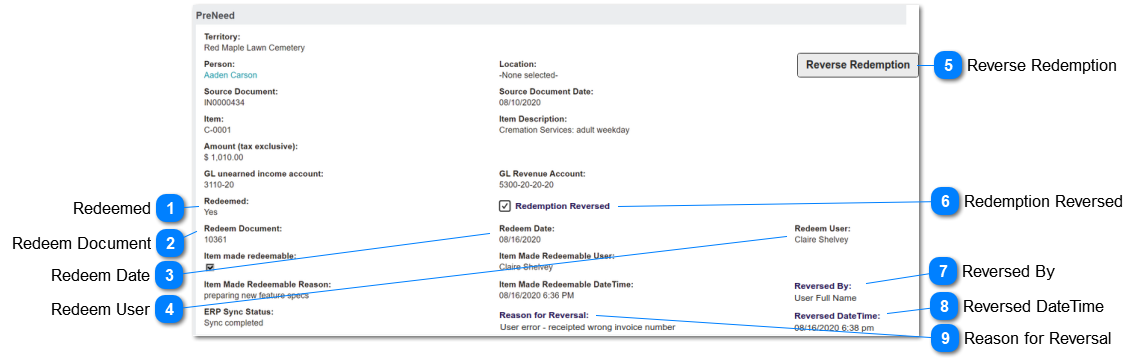
The Pre-Need register is a listing of all items purchased using the Pre-Need checkbox during the sales invoice process.
The Pre-Need entries are linked to Person and Location records.
If integrated with Sage 300, redemptions result in General Ledger journals.
August 2020 update: inclusion of new function to reverse a redemption
Refer bottom of page for table of pre-existing fields and functions.
 Redeemed
This indicates whether the item has been used and/or the service provided.
|
Type
|
Notes
|
Rules
|
Compulsory
|
Format
|
Edit
|
Size
|
Default
|
Error Message
|
|
Selection List
|
|
The Yes/No setting is controlled by the following functions:
1) when pre-need entry is created - set to No.
2) when pre-need "redeem" action is selected on a sales & booking record - set to no.
2a) if integrated with Sage 300 results in GL journals.
|
|
text
|
No
|
|
|
| |
|
 Redeem Document
This is the source transaction number for a redeemed entry.
|
Type
|
Notes
|
Rules
|
Compulsory
|
Format
|
Edit
|
Size
|
Default
|
Error Message
|
|
Text
|
|
1) when pre-need "redeem" action is selected on a sales & booking record - this equals the S&B number
[tran_opssaleid].
2) when redeemed by a credit note, this equals the document number
[orhe_documentnumber].
|
|
|
N
|
|
|
| |
|
 Redeem Date
This is the date the pre-need entry is redeemed.
|
Type
|
Notes
|
Rules
|
Compulsory
|
Format
|
Edit
|
Size
|
Default
|
Error Message
|
|
Date
|
|
1) the current date is inserted by the redeem function on a S&B record.
2) the current date is inserted by the redeem function of a credit note.
|
|
|
N
|
|
|
| |
|
 Redeem User
This is the person who redeemed the pre-need entry.
|
Type
|
Notes
|
Rules
|
Compulsory
|
Format
|
Edit
|
Size
|
Default
|
Error Message
|
|
User ID
|
|
1) the current user ID is inserted by the redeem function on a S&B record.
2) the current user ID is inserted by the redeem function of a credit note.
|
|
|
N
|
|
|
| |
|
 Reverse Redemption
This is a button function to set a redeemed pre-need entry back to not redeemed.
|
Type
|
Notes
|
Rules
|
Compulsory
|
Format
|
Edit
|
Size
|
Default
|
Error Message
|
|
Button
|
|
1) Visible only to users with the security function "Can make item redeemable".
[user_canmakeitemredeemable = Y]
2) Visible only if Redeemed = Yes
[prnd_redeemed = Y]
3) When selected opens the Reverse Redemption screen
|
N
|
|
|
|
|
| |
|
 Redemption Reversed
This will be flagged to Y if the Reverse Redemption function has been used.
|
Type
|
Notes
|
Rules
|
Compulsory
|
Format
|
Edit
|
Size
|
Default
|
Error Message
|
|
Checkbox
|
|
1) Visible only if set to Y
2) Populated by the Reverse Redemption function.
|
|
|
N
|
|
|
| |
|
 Reversed By
This is the person who reversed a pre-need redemption.
|
Type
|
Notes
|
Rules
|
Compulsory
|
Format
|
Edit
|
Size
|
Default
|
Error Message
|
|
User ID
|
|
1) Visible only if not null.
2) Populated by the Reverse Redemption function.
|
|
|
N
|
|
|
| |
|
 Reversed DateTime
This is the date and time a pre-need redemption was reversed.
|
Type
|
Notes
|
Rules
|
Compulsory
|
Format
|
Edit
|
Size
|
Default
|
Error Message
|
|
DateTime
|
|
1) Visible only if not null.
2) Populated by the Reverse Redemption function.
|
|
|
N
|
|
|
| |
|
 Reason for Reversal
This is the reason why the pre-need entry was reversed, as entered by the user.
|
Type
|
Notes
|
Rules
|
Compulsory
|
Format
|
Edit
|
Size
|
Default
|
Error Message
|
|
Text
|
|
1) Visible only if not null.
2) Populated by the Reverse Redemption function.
|
|
|
N
|
Multi-line text
|
|
| |
|
|
Field
|
Description
|
Associated Business Process
|
|
Territory
|
The site/cemetery to which the Reference person is linked
|
|
|
Person
|
Link to person record who is the intended recipient of pre-need items
|
Can be edited
|
|
Location
|
Link to location record intended for use of pre-need items
|
Can be edited
|
|
Source Document
|
Invoice number of originating sale
|
Determined during sales invoice process.
GL account numbers are taken from the configuration entry on the Item Category.
In Sage 300 integrated system, redeem process creates GL journal debiting unearned income and crediting revenue accounts.
|
|
Source Document Date
|
Invoice date
|
|
Item
|
Item code
|
|
Item Description
|
Item description for product or service purchased
|
|
Amount (tax exclusive)
|
Value of item
|
|
GL Unearned Income Account
|
General Ledger balance sheet account code in financial system holding (that held) corresponding valuation
|
|
GL Revenue Account
|
General Ledger revenue account code in financial system (to be) used on redemption
|
|
Redeemed
|
Checkbox where Y indicates item has been used
|
Determined during Pre-Need Redemption process
|
|
Redeemed Date
|
Date field records when redeemed
|
|
Redeemed User
|
User name identifies staff member who processed redemption
|
|
Item Made Redeemable
|
Checkbox where Y indicates redemption over-ride was actioned
|
Determined using the Make Item Redeemable function.
Displayed on screen only if actioned
|
|
Item Made Redeemable User
|
User name identifies staff member who made item redeemable
|
|
Item Made Redeemable Reason
|
Text field records reason why item was made redeemable
|
|
Item Made Redeemable Date/Time
|
Date & time field records when item was made redeemable
|