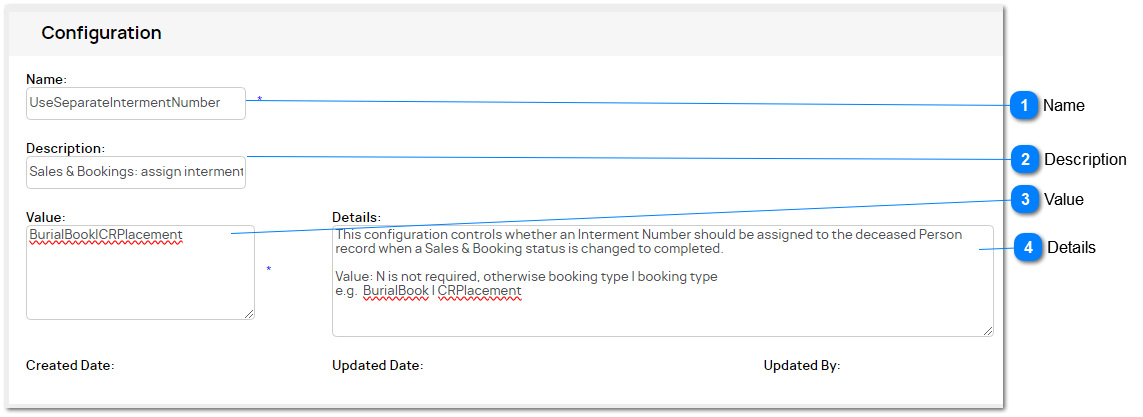
This configuration option allows the system administrator to define whether an auto-incrementing Interment Number should be assigned to the Deceased Person record, when a Burial Booking or CR Interment Booking is completed.
Name
This is a new Configuration option: UseSeparateIntermentNumber
N - not required (no automated numbering to apply)
If yes, automated numbering is required, then the Sales & Booking Types required are to be entered, separated by a pipe symbol. tran_type: use the code, e.g. Burial Booking = BurialBook
1. All booking types listed here will share the same numbering sequence by territory (refer Reference Numbers - Interments for setup details)
2. Number sequences can be set by Territory
2a. Parent territory means one number range all sites 2b. Separate Site/territory ranges are allowed
The logic will need to:
- first find the interment reference number record using the site level secterr (based on Person/deceased)
- if not found, move on to the next level on the territory tree until it reaches the top level
3. Prefix is required to ensure unique identifiers are created (by territory)
3a. ensures no conflict with the existing logic to check that pers_intermentRef is unique.
4. When a Sales & Booking status is changed to completed, with a type code matching the VALUE, the following field is to be updated with the next reference number:
This configuration controls whether an Interment Number should be assigned to the deceased Person record when a Sales & Booking status is changed to completed.
Value: N is not required If automated numbering is required, then enter the booking type codes to apply, separated by a pipe symbol, e.g.