To properly display this page you need a browser with JavaScript support.
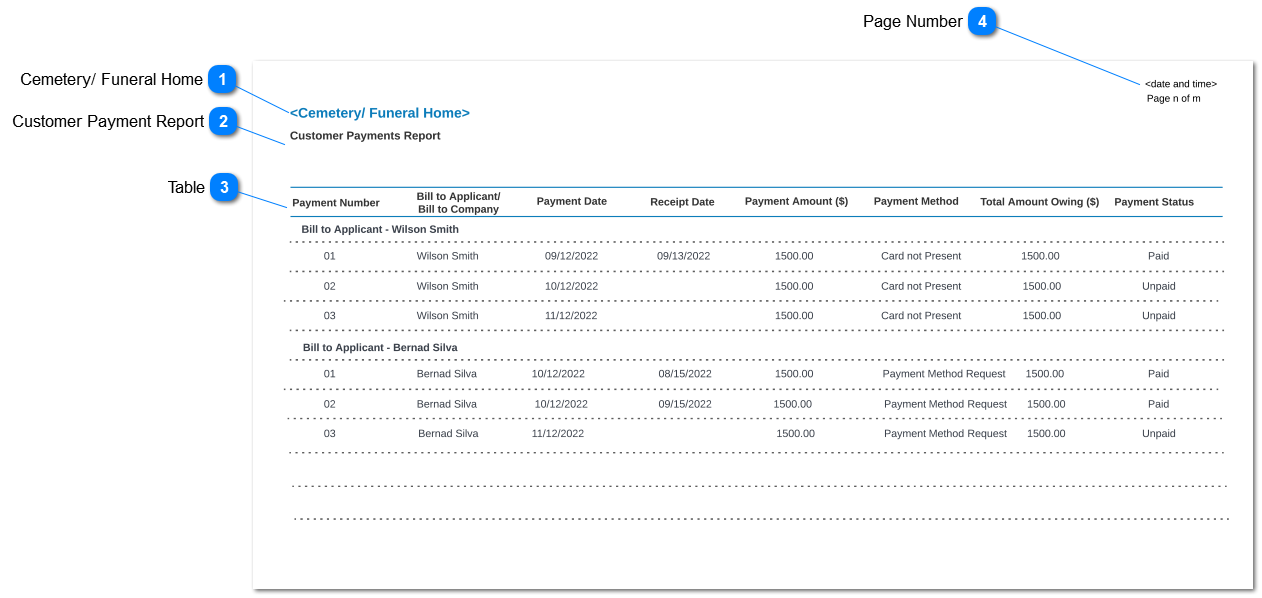
This report will list the payment transaction which provide payment transaction details where it can be grouped by payment method and Bill to Applicant/ Bill to Company. This Report is generated from the
Customer Payment Report - Parameters screen
Cemetery/ Funeral Home
Type
Notes
Rules
Compulsory
Placeholder
Format
Edit
Size
Default
Messages
Read-only text
1. Respective funeral home/ cemetery name will be shown.
-
-
-
-
-
-
-
-
Customer Payment Report
Type
Notes
Rules
Compulsory
Placeholder
Format
Edit
Size
Default
Messages
Read-only text
Name of the report
-
-
-
-
-
-
-
-
Table
Type
Notes
Rules
Compulsory
Placeholder
Format
Edit
Size
Default
Messages
Read-only text
Display Payment Number
Display Repayment Number on Repayment Plan screen ( (Sales and Booking> Sales> Sales Order> Repayment Plan> Repayment Number)
-
-
-
-
-
-
-
Read-only text
Display Bill to Applicant/ Bill to Company
Display Bill to Applicant field on the Sales and Booking> Sales tab> Sales Order> Bill to Applicant
Display Bill to Company field on the Sales and Booking> Sales tab> Sales Order> Bill to Company
Read-only text
Display Payment Date
Display Repayment Date on Repayment Plan screen (Sales and Booking> Sales> Sales Order> Repayment Plan> Repayment Date)
Read-only text
Display Receipt Date
Display Receipt Date on Receipt Tab screen (Sales and Booking> Receipt Tab> Receipt Date)
Read-only text
Display Payment Amount
Display Repayment Amount on Repayment Plan screen (Sales and Booking> Receipt Tab> Amount)
Read-only text
Display Payment Method
Display Payment Method on payment details screen (Sales and Booking> Sales Tab> Sale Order> Payment Details> Payment Method)
Read-only text
Display Total Amount Owing
Display Amount Owing based on bellow formula;
Total Amount Owing = Repayment Amount - Paid Amount (Receipts + Credit Note
Repayment Amount is fetch from Repayment Plan (Sales and Booking> Sales Tab> Sale Order> Repayment Plan> Repayment Amount)
Payment Amount is fetch from Receipt Tab( Sales and Booking> Receipt Tab> Amount)
Read-only text
Display Payment Status
Display payment status from Repayment Plan (Sales and Booking> Sales Tab> Sale Order> Repayment Plan> Payment Status)
Read-only text
Display Group
Page Number
Type
Notes
Rules
Compulsory
Placeholder
Format
Edit
Size
Default
Messages
Read-only text
-
Display the page number and Date and Time report was generated from the system
-
-
-
-
-
-
-